
How Python Works Internally: From Source Code to Bytecode and the Python Virtual Machine
How Python Works Internally
Introduction
Python is one of the world's most popular programming languages because of its simplicity, readability, and versatility. But have you ever wondered what happens behind the scenes when you run a Python program?
Although Python is often called an interpreted language, the execution process is more interesting than simply reading and executing code line by line.
In this article, we'll explore how Python executes your program—from writing a .py file to generating bytecode and finally executing it using the Python Virtual Machine (PVM).
Why Understanding Python Internals Matters
Understanding Python's internal working helps you:
- Write better and more efficient Python code.
- Understand why Python is platform-independent.
- Debug performance issues more effectively.
- Prepare for technical interviews.
- Gain a deeper understanding of programming language design.
The Python Execution Process
The execution flow of a Python program looks like this:
hello_python.py
       │
       ▼
Python Compiler
       │
       ▼
Bytecode (.pyc)
       │
       ▼
Python Virtual Machine (PVM)
       │
       ▼
Program Output
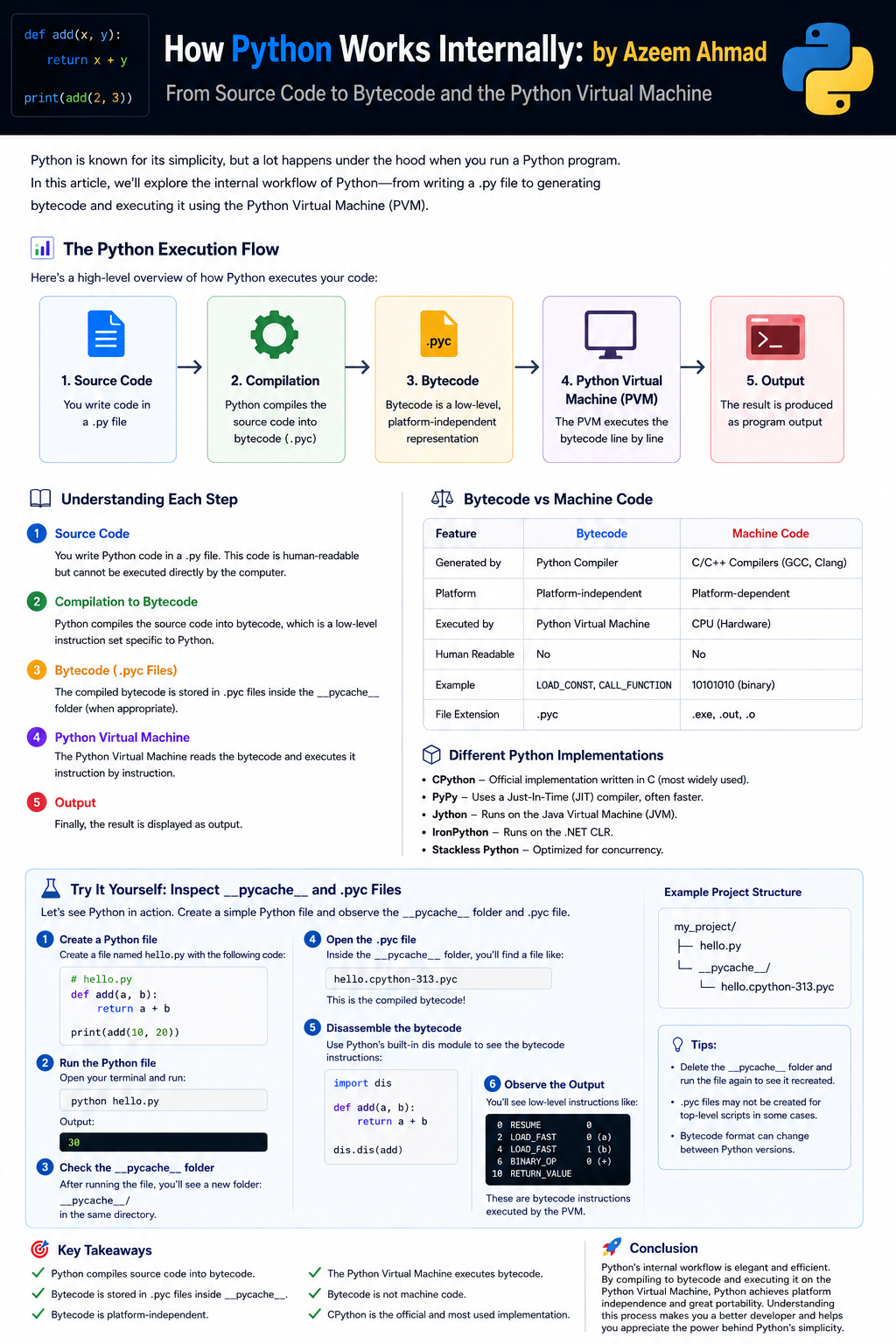 Figure: How Python source code is compiled to bytecode and executed by the PVM.
Let's understand each step in detail.
Step 1 – Writing the Python Source Code
Suppose we create a Python file named:
hello_python.py

print("Hello, World!")
This file contains Python source code.
Source code is human-readable but cannot be executed directly by the computer.
Step 2 – Compilation into Bytecode
When you run a Python program, Python first compiles the source code into bytecode.
hello_python.py
        │
        ▼
Bytecode (.pyc)
Unlike languages like C or C++, this compilation happens automatically.
You don't have to manually compile your program.
What is Bytecode?
Bytecode is a low-level representation of your Python program.
It is:
- Platform-independent
- Easier for Python to execute
- Faster to load than source code
Bytecode is not machine code.
Your CPU cannot understand bytecode directly.
Instead, it must be executed by Python's Virtual Machine.
The .pyc File
Compiled bytecode is stored in files having the .pyc extension.
Example:
hello_python.cpython-313.pyc
Here,
- cpython indicates the Python implementation.
- 313 indicates Python version 3.13.
The __pycache__ Folder
Python stores compiled bytecode inside a folder named:
__pycache__
Example project structure:
project/
├── hello_python.py
└── __pycache__/
      └── hello_python.cpython-313.pyc
Python creates this folder automatically.
Why Does Python Create .pyc Files?
Python creates .pyc files to improve performance.
Instead of compiling the source code every time, Python can reuse the previously generated bytecode if:
- The source code has not changed.
- The Python version remains the same.
This makes importing modules faster.
When Are .pyc Files Created?
Generally,
- Imported Python modules create
.pycfiles. - Top-level scripts that you execute directly usually do not rely on cached
.pycfiles in the same way.
Python decides automatically whether creating a .pyc file is beneficial.
Step 3 – Python Virtual Machine (PVM)
After compilation, Python sends the bytecode to the Python Virtual Machine (PVM).
Source Code
      │
      ▼
Bytecode
      │
      ▼
Python Virtual Machine
      │
      ▼
Output
The PVM reads the bytecode instructions one by one and executes them.
This execution process is what makes Python an interpreted language.
What is the Python Virtual Machine?
The Python Virtual Machine is the runtime engine of Python.
Its responsibilities include:
- Reading bytecode
- Executing instructions
- Managing memory
- Handling exceptions
- Running your Python program
You can think of the PVM as the engine that powers every Python application.
Bytecode vs Machine Code
| Bytecode | Machine Code |
|---|---|
| Generated by Python | Generated by compilers like GCC or Clang |
| Platform-independent | Platform-dependent |
| Executed by the Python Virtual Machine | Executed directly by the CPU |
| Not understood by hardware | Directly understood by hardware |
Is Python Really an Interpreted Language?
This is a common interview question.
The answer is:
Yes, but not entirely.
Python follows a two-step execution process:
- Source code is compiled into bytecode.
- The Python Virtual Machine interprets the bytecode.
Therefore, Python is often described as both compiled and interpreted.
Different Python Implementations
Python has several implementations.
1. CPython
- Official Python implementation.
- Written in C.
- Most widely used implementation.
2. PyPy
- Uses a Just-In-Time (JIT) compiler.
- Usually faster than CPython for long-running programs.
3. Jython
- Runs on the Java Virtual Machine (JVM).
- Allows Python to interact with Java libraries.
4. IronPython
- Runs on Microsoft's .NET Common Language Runtime (CLR).
5. Stackless Python
- Designed for lightweight concurrency.
- Useful for applications requiring many simultaneous tasks.
Complete Execution Flow
          hello_python.py
                 │
                 ▼
      Python Compiler
                 │
                 ▼
        Bytecode (.pyc)
                 │
                 ▼
     Python Virtual Machine
                 │
                 ▼
        Machine Instructions
                 │
                 ▼
              Output
Example
Consider the following program:
x = 10
y = 20

print(x + y)
Python internally performs the following steps:
- Reads the source code.
- Compiles it into bytecode.
- Stores the bytecode (when appropriate).
- Sends the bytecode to the Python Virtual Machine.
- The PVM executes each instruction.
- Displays:
30
Common Misconceptions
Python executes .py files directly.
Not exactly.
Python first converts source code into bytecode.
Bytecode is machine code.
No.
Bytecode is Python-specific and cannot be executed directly by the CPU.
Python always creates .pyc files.
Not always.
Python mainly generates cached bytecode for imported modules and when it is useful to do so.
Key Takeaways
- Python programs are written in
.pyfiles. - Python automatically compiles source code into bytecode.
- Bytecode is stored as
.pycfiles inside the__pycache__directory. - Bytecode is platform-independent.
- The Python Virtual Machine executes bytecode.
- Bytecode is not machine code.
- CPython is the official Python implementation.
Conclusion
Although Python appears simple from the outside, several steps occur before your program runs.
Python first compiles your source code into platform-independent bytecode. This bytecode is cached inside the __pycache__ directory and then executed by the Python Virtual Machine (PVM). Understanding this execution process gives you a deeper appreciation of Python's design and helps you become a more knowledgeable Python developer.
Whether you're preparing for interviews, learning Python, or simply curious about programming language internals, knowing how Python works behind the scenes is an important step toward mastering the language.
Thank You for Reading!
If you found this article helpful, consider following my blog for more tutorials on:
- Python
- C++
- Data Structures & Algorithms
- MERN Stack
- Next.js
- Artificial Intelligence
- Software Engineering
Happy Coding!
Comments
Join the discussionNo comments yet. Be the first to comment.